
How can a golf course improve digital hospitality for someone reading their Google map listing?
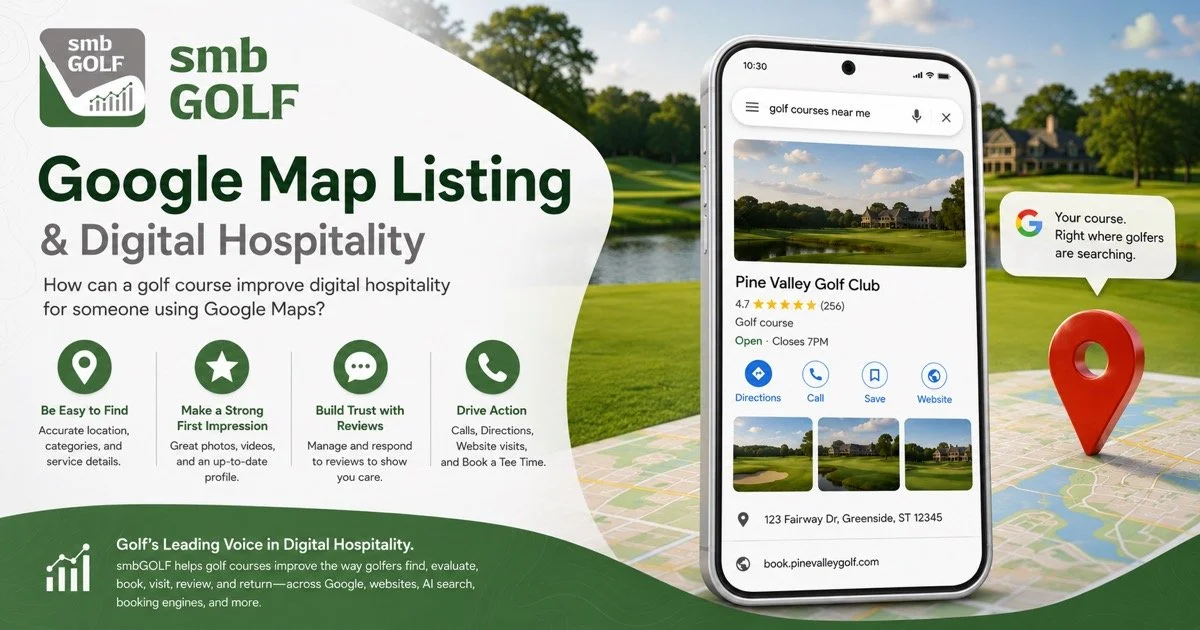
Google Map Listing
Here is a stronger, expanded version you can use:
A Google map listing — also known as a Google Business Profile — is often the very first impression a golfer has of a course. That makes it one of the most important pieces of digital hospitality a golf course controls.
Digital hospitality on Google Maps means answering the golfer’s questions before they have to ask them. Is this course open to the public? Can I book online? Is the course in good shape? Do they have a driving range? Can I buy a gift card? Are there current specials, events, or updates I should know about?
A strong Google Business Profile should help the golfer feel confident, informed, and ready to take action.
To improve the digital hospitality of a map listing, a golf course should focus on several key areas.
Accurate Business Information
The foundation is accuracy. The course name, address, phone number, website, hours, holiday hours, and booking link should all be correct. If a golfer sees outdated information, broken links, confusing hours, or an incorrect phone number, the experience starts with frustration instead of confidence.
The listing should also include a useful business description that quickly explains what type of facility it is: public golf course, private club, semi-private club, resort course, municipal course, practice facility, event venue, or restaurant-supported golf operation.
Smart Category Choices
Category selection is one of the most overlooked parts of digital hospitality. Google says business categories help customers understand what a business does, connect businesses with relevant searches, and can affect local ranking. Google also recommends choosing a primary category that best describes the business and using only a few additional categories that accurately describe important public-facing services. (Google Help)
For a golf course, the primary category should usually reflect the core business. In many cases, that may be Golf Course, but some facilities may be better represented as Country Club, Golf Club, Public Golf Course, Golf Driving Range, or another available category depending on the actual operation and the categories Google provides.
Additional categories should be used thoughtfully. A course with a true golf shop, instruction program, restaurant, wedding business, event space, simulator operation, or driving range may benefit from adding relevant secondary categories. The goal is not to stuff the listing with every possible service. The goal is to help Google and golfers understand what the facility actually offers.
Good category choices improve the golfer’s experience because they make the listing more complete and more relevant. A golfer looking for a driving range, golf lessons, a wedding venue, or a public tee time should be able to discover those parts of the business through the profile.
Clear Booking Options
A golf course should make the next step obvious. If the golfer wants to play, they should not have to hunt for a tee time.
Google allows businesses to set up bookings through eligible providers or add their own booking link to the Business Profile. Google also notes that booking providers may appear on the profile within about a week, and that performance data is available for Reserve with Google bookings but not for custom links. (Google Help)
For golf courses, this matters because the booking button or booking link is often the most important conversion point on the listing. The best version of digital hospitality is a clean path from “I found you” to “I booked a tee time.”
A course should review whether the profile shows:
A direct Book Online button or booking link
The correct tee time booking engine
A course-owned booking destination instead of a confusing third-party path
A clear phone number for golfers who prefer to call
Separate links when appropriate for tee times, lessons, outings, restaurant reservations, or event inquiries
Reserve with Google is only available in certain countries and for businesses that work with supported scheduling providers, so not every golf course will have the same booking experience available. (Google Help) If a course cannot support a native Google booking experience, it should still make sure its custom booking link is accurate, fast, mobile-friendly, and pointed to the best possible destination.
Product Listings
Product listings can turn a Google Business Profile into more than a static directory listing. Google’s product editor allows a business to add and publish products directly to the profile, and Google also connects some product management through Merchant Center when applicable. (Google Help)
For a golf course, “products” do not have to mean only physical merchandise. They can be used to help golfers quickly understand what the facility offers. Examples may include:
18-hole tee times
9-hole tee times
Driving range buckets
Golf lessons
Gift cards
Golf shop merchandise
Junior golf programs
Memberships or passes
Outings and events
Simulator rentals
Restaurant or patio features
Each product listing should include a strong photo, a clear title, a short description, and a useful call to action. This helps the golfer discover more of the business without needing to dig through the website.
This is especially valuable for facilities that have more revenue opportunities than tee times alone. A golfer may arrive at the listing intending to book a round, but discover lessons, gift cards, range access, or an upcoming event.
Posts, Offers, and Events
Posts are another way to make the listing feel alive. Google says Business Profile posts can be used to share announcements, offers, updates, event details, photos, videos, and action buttons directly on Search and Maps. Google also notes that these updates can help customers decide whether to visit the business. (Google Help)
For a golf course, posts should be used like timely hospitality messages. They can answer the question, “What is happening at the course right now?”
Good post ideas include:
Course condition updates
Aerification notices
Frost delay updates
Daily deals or seasonal tee time offers
Range updates
New golf shop arrivals
Holiday gift card promotions
Junior golf registration
League openings
Outing availability
Patio, restaurant, or live music announcements
Stay-and-play packages
Instruction clinics
Posts should not be random. They should help the golfer make a decision. A good post gives the golfer a reason to book, call, visit, buy, or learn more.
Photos That Build Confidence
Photos are one of the fastest ways to communicate quality. A golf course should regularly add photos that show the experience a golfer can expect: tee shots, greens, fairways, bunkers, clubhouse, golf shop, patio, food and beverage, practice areas, carts, signage, and staff hospitality.
The photo mix should answer practical questions. What does the course look like? Is it well maintained? Is the clubhouse welcoming? Is the golf shop professional? Is the patio active? Is this a place I want to spend four hours?
A profile with old, dark, low-quality, or mostly user-generated photos may not reflect the actual quality of the property. Strong owner-uploaded photos help shape the first impression.
Reviews as Proof of Execution
Reviews are a major trust signal. Strong public reviews tell the golfer that other people have had a good experience. Just as important, thoughtful owner responses show that the course is listening.
A golf course should respond to reviews in a way that sounds human, appreciative, and specific. Positive reviews should be acknowledged. Negative reviews should be handled professionally and calmly. The response itself becomes part of the hospitality experience because future golfers are reading it.
The Bigger Point
A Google Business Profile should not be treated as a static listing. It should be treated like a digital front door.
When the listing is clear, accurate, current, visual, and easy to act on, the golfer begins the experience believing the course is organized, thoughtful, and worth visiting before they ever arrive at the property.
The best golf course map listings do more than provide directions. They reduce uncertainty. They answer questions. They create confidence. They make it easy to book. They show what is happening now. They help the golfer feel welcomed before the first phone call, website visit, or tee time reservation.